PyTorch DataLoader Explained: Datasets, Batches, and Image Folders
Where you are: Post 4 of 14 in PyTorch Tutorial 2026 · about 10 min read
What you’ll build: tinydit/data.py: a CIFAR-10 loader that yields (N, 3, 32, 32) batches in [-1, 1], a fixed held-out loader, and an image-folder dataset so you can train on your own pictures.
You’ll need: Post 2 (tinydit/images.py) and Post 3 (autograd and the training heartbeat).
In this post:
- Introduction
- Step 1/6: Dataset vs DataLoader
- Step 2/6: Loading CIFAR-10 and Its Transforms
- Step 3/6: The TinyDiT Data Module
- Step 4/6: The PyTorch DataLoader in Action
- Step 5/6: Train on Your Own Images
- Step 6/6: When __getitem__ Is Wrong
- Recap
Series: PyTorch Tutorial 2026 (14 posts)
- Post 1: PyTorch Tutorial 2026: From Tensors to Tiny Diffusion
- Post 2: PyTorch Tensors Explained: Shapes, Broadcasting, and Images as Arrays
- Post 3: PyTorch Autograd: How backward() Builds Gradients
- Post 4: PyTorch DataLoader Explained: Datasets, Batches, and Image Folders (you are here)
- Post 5: PyTorch nn.Module and the Training Loop: Layers, Loss, and Checkpoints
- Post 6: Attention and the Transformer Block in PyTorch
- Post 7: Patch Embeddings in PyTorch: How a Transformer Reads an Image
- Post 8: Flow Matching in PyTorch: Train a Model to Follow a Straight Line
- Post 9: Build a Tiny Diffusion Transformer in PyTorch (DiT from Scratch)
- Post 10: torch.compile, Mixed Precision, and SDPA: Speed Up TinyDiT
- Post 11: RMSNorm, QK-Norm, SwiGLU, and 2D RoPE in a Tiny DiT
- Post 12: adaLN-Zero and Classifier-Free Guidance in PyTorch
- Post 13: MMDiT Joint Attention in PyTorch: Two Streams, One Generator
- Post 14: Train and Sample Like 2026: Logit-Normal Steps, EMA, and Few-Step Flow
Introduction
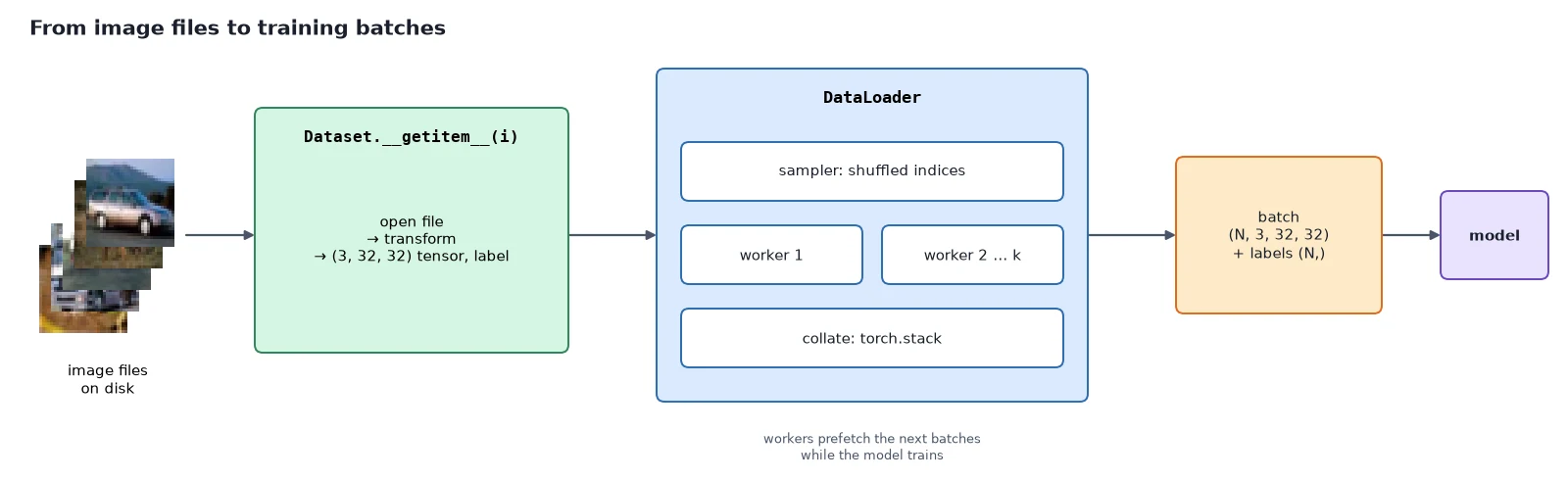
A model is only as good as the batches you feed it. The PyTorch DataLoader is the tool that turns a folder of pictures into a steady stream of shuffled, batched tensors, while background workers load the next batch as the model trains on this one.
In this post we build the data side of TinyDiT: a Dataset that returns one image, a DataLoader that stacks images into (N, 3, 32, 32) batches, a CIFAR-10 loader for the default runs, and a custom image-folder dataset so you can train on your own pictures later without rewriting anything.
In PyTorch Tensors Explained: Shapes, Broadcasting, and Images as Arrays we built tinydit/images.py to turn one picture into a tensor, and in PyTorch Autograd: How backward() Builds Gradients we saw how a training loop learns from data with autograd. Now we connect the two: lots of pictures in, tidy batches out.
Step 1/6: Dataset vs DataLoader
In this step: We split data loading into its two jobs, fetching one sample and batching many, and try both on a ten-sample toy dataset.
PyTorch splits data loading into two jobs:
- A Dataset knows how many samples there are and how to fetch one sample by its index. That’s it: two methods,
__len__and__getitem__. - A DataLoader wraps a Dataset and does everything else: picks the order (shuffled or not), groups samples into batches, stacks them into tensors, and can load in parallel with worker processes.
This split is why you can swap CIFAR-10 for your own photos without touching the training code: only the Dataset changes.
Here is the smallest possible Dataset, where sample i is the pair (i, i^2):
import torch
from torch.utils.data import Dataset, DataLoader

class Squares(Dataset):
    """Sample i is the pair (i, i*i). The smallest possible Dataset."""
    def __init__(self, n: int):
        self.n = n

    def __len__(self) -> int:                 # how many samples
        return self.n

    def __getitem__(self, i: int):            # ONE sample, by index
        x = torch.tensor([float(i)])
        return x, x ** 2

ds = Squares(10)
print(len(ds), ds[3])

loader = DataLoader(ds, batch_size=4, shuffle=False)
for xb, yb in loader:
    print(tuple(xb.shape), xb.flatten().tolist(), "->", yb.flatten().tolist())

torch.manual_seed(0)
shuffled = DataLoader(ds, batch_size=4, shuffle=True)
print("epoch 1:", [xb.flatten().int().tolist() for xb, _ in shuffled])
print("epoch 2:", [xb.flatten().int().tolist() for xb, _ in shuffled])10 (tensor([3.]), tensor([9.]))
(4, 1) [0.0, 1.0, 2.0, 3.0] -> [0.0, 1.0, 4.0, 9.0]
(4, 1) [4.0, 5.0, 6.0, 7.0] -> [16.0, 25.0, 36.0, 49.0]
(2, 1) [8.0, 9.0] -> [64.0, 81.0]
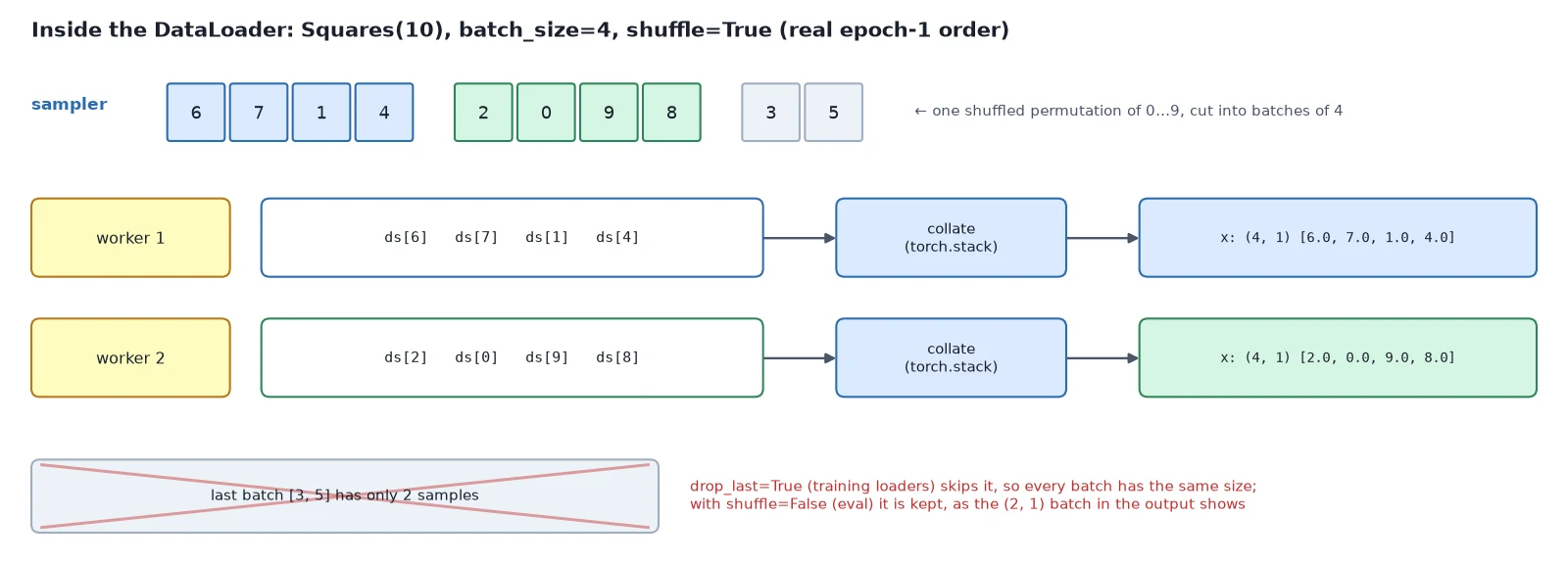
epoch 1: [[6, 7, 1, 4], [2, 0, 9, 8], [3, 5]]
epoch 2: [[2, 4, 7, 0], [8, 9, 5, 3], [6, 1]]Three things to notice:
ds[3]calls__getitem__(3)and returns one sample.- The DataLoader asked for samples 0–3, stacked them into a
(4, 1)tensor, and did the same for 4–7. The last batch only had 2 samples left, so it’s smaller. - With
shuffle=True, every epoch (one full pass over the data) visits all 10 samples exactly once, but in a new random order each time.
Dataset: what, why, how
What it is: a uniform way to say “there are n samples, and here’s sample i“. TinyDiT’s training code only ever talks to this interface, so it doesn’t know or care whether the pictures come from CIFAR-10 or your folder.
Why it works: loading, decoding, resizing and normalizing one image is per-sample work. Putting it in __getitem__ means it happens lazily, only for the samples being used right now, so a dataset can be far bigger than your RAM. It also gives the DataLoader something it can call from several worker processes at once.
How it works: subclass torch.utils.data.Dataset, implement __len__ (return the count) and __getitem__(i) (return one (image, label) pair, already transformed). ImageFolderDataset (step 5) finds file paths in __init__ (cheap), and opens and transforms one file per __getitem__ call (the expensive part, done on demand).
DataLoader: what, why, how
What it is: the tool that turns a Dataset into an iterator of batches: for images, labels in loader:.
Why it works: slicing tensors by hand drops things you need: fresh shuffling every epoch, background workers, prefetching, pinned memory, and correct handling of the last batch. The DataLoader does all of it in one well-tested place.
How it works: each epoch, a sampler produces the index order (a fresh random permutation if shuffle=True). The indices are cut into groups of batch_size. Workers call dataset[i] for each index in a group, and a collate function stacks the results: (3, 32, 32) images become (N, 3, 32, 32), and integer labels become a (N,) int64 tensor.
With num_workers > 0, several batches are prepared ahead of time while the model trains.
What you just built: A toy Dataset with __len__ and __getitem__, batched and shuffled by a DataLoader.
Step 2/6: Loading CIFAR-10 and Its Transforms
In this step: We download CIFAR-10 and build the minimal transform chain that turns each PIL image into a (3, 32, 32) tensor in [-1, 1].
CIFAR-10 is 60,000 color photos of 32×32 pixels in 10 classes: airplane, automobile, bird, cat, deer, dog, frog, horse, ship and truck. There are 50,000 training images and 10,000 test images.
It’s small enough to train on in minutes, but real enough that a model has to learn actual shapes and colors. torchvision downloads it for you:
from torchvision import datasets
from tinydit.data import CIFAR10_CLASSES

raw = datasets.CIFAR10(root="data", train=True, download=True)   # ~170 MB the first time
img, label = raw[0]
print(len(raw), "training images")
print(type(img).__name__, img.size, img.mode, "| label:", label, CIFAR10_CLASSES[label])50000 training images
Image (32, 32) RGB | label: 6 frogOut of the box each sample is a PIL image plus an integer label, not a tensor. A model can’t eat a PIL image, so we need a transform.
Transforms with torchvision.transforms.v2
A transform is a function applied to each sample inside __getitem__. We keep ours minimal: convert to a tensor, make sure the size is right, flip half the images left-to-right (a free way to get more variety from the same data), convert to float32, and normalize from [0, 1] to [-1, 1]:
\begin{aligned} &\underbrace{\text{PIL}}_{\text{H,W,C uint8}} \xrightarrow{\texttt{ToImage}} \underbrace{(3, H, W)}_{\text{uint8}} \xrightarrow{\texttt{Resize, CenterCrop}} (3, 32, 32) \\ &\xrightarrow{\texttt{Flip (train)}} \xrightarrow{\texttt{ToDtype(scale)}} \underbrace{[0, 1]}_{\div 255} \xrightarrow{\texttt{Normalize}(0.5,\,0.5)} \underbrace{[-1, 1]}_{(x - 0.5)/0.5} \end{aligned}That last step is the same 2x – 1 convention from post 2, so everything coming out of our loaders matches the images that load_image produces. We use the transforms.v2 API, which is the recommended torchvision transforms API in current releases.
Why it works: For a classifier, heavy augmentation (random crops, color jitter, rotations) helps a lot. For a generator, it would teach the model to produce rotated, color-shifted pictures. A horizontal flip is safe because a mirrored horse is still a normal horse.
What you just built: A transform chain from PIL image to a float32 (3, 32, 32) tensor in [-1, 1], with a horizontal flip for training only.
Step 3/6: The TinyDiT Data Module
In this step: We write tinydit/data.py, the only data code the rest of the series needs, one function at a time.
Here is tinydit/data.py. The top of the file holds the imports, the ten CIFAR-10 class names and the image extensions we accept:
"""Datasets and DataLoaders (post 4).

Every loader yields (images, labels):
  images: float32 (N, 3, 32, 32), values in [-1, 1]
  labels: int64 (N,)  (CIFAR-10 class id, or folder index for ImageFolderDataset)
"""
from pathlib import Path

import torch
from PIL import Image
from torch.utils.data import DataLoader, Dataset, Subset
from torchvision import datasets
from torchvision.transforms import v2

CIFAR10_CLASSES = ["airplane", "automobile", "bird", "cat", "deer",
                   "dog", "frog", "horse", "ship", "truck"]

IMG_EXTS = {".png", ".jpg", ".jpeg", ".webp", ".bmp"}make_transform is the transform chain from step 2:
def make_transform(img_size: int = 32, train: bool = True) -> v2.Compose:
    """PIL image -> float tensor (3, img_size, img_size) in [-1, 1]."""
    steps = [
        v2.ToImage(),                                   # PIL -> uint8 tensor (C, H, W)
        v2.Resize(img_size, antialias=True),            # short side -> img_size
        v2.CenterCrop(img_size),                        # square crop
    ]
    if train:
        steps.append(v2.RandomHorizontalFlip())         # cheap, safe augmentation
    steps += [
        v2.ToDtype(torch.float32, scale=True),          # uint8 [0, 255] -> float [0, 1]
        v2.Normalize(mean=[0.5, 0.5, 0.5], std=[0.5, 0.5, 0.5]),  # [0, 1] -> [-1, 1]
    ]
return v2.Compose(steps)Resize and CenterCrop do nothing on CIFAR (already 32×32) but matter for your own photos.
get_cifar10 wraps torchvision’s dataset, and can keep only some classes (classes=[1] for cars only) or only the first limit images for quick CPU runs:
def get_cifar10(root: str | Path = "data", train: bool = True,
                classes: list[int] | None = None, limit: int | None = None,
                download: bool = True) -> Dataset:
    """CIFAR-10 in [-1, 1]. `classes` keeps only those labels, `limit` caps the size (for CPU runs)."""
    ds = datasets.CIFAR10(root=str(root), train=train, download=download,
                          transform=make_transform(32, train))
    indices = list(range(len(ds)))
    if classes is not None:
        keep = set(classes)
        indices = [i for i, y in enumerate(ds.targets) if y in keep]
    if limit is not None:
        indices = indices[:limit]
    if len(indices) == len(ds):
        return ds
return Subset(ds, indices)It uses Subset, a Dataset that exposes a list of indices of another Dataset.
make_loader sets sensible defaults: shuffle and drop the last ragged batch for training, keep everything in a fixed order for evaluation:
def make_loader(dataset: Dataset, batch_size: int = 128, shuffle: bool = True,
                num_workers: int = 2, drop_last: bool | None = None) -> DataLoader:
    """Training loaders shuffle and drop the last ragged batch; eval loaders do neither."""
    if drop_last is None:
        drop_last = shuffle
    return DataLoader(dataset, batch_size=batch_size, shuffle=shuffle,
                      num_workers=num_workers, drop_last=drop_last,
                      pin_memory=torch.cuda.is_available(),
persistent_workers=num_workers > 0)Note: The same file also holds ImageFolderDataset (step 5) and CachedCIFAR10, an in-memory CIFAR-10 we add in post 9 for fast CPU training.
What you just built: make_transform, get_cifar10 and make_loader in tinydit/data.py.
Step 4/6: The PyTorch DataLoader in Action
In this step: We pull real CIFAR-10 batches, look at them, and tune the loader for fast CPU runs and parallel loading.
import torch
from tinydit.data import get_cifar10, make_loader, CIFAR10_CLASSES

torch.manual_seed(0)
train_set = get_cifar10("data", train=True)
test_set = get_cifar10("data", train=False)
print("train:", len(train_set), "| test:", len(test_set))

x, y = train_set[0]                       # one sample, already transformed
print("one sample:", tuple(x.shape), x.dtype, "| label", y)

train_loader = make_loader(train_set, batch_size=128, shuffle=True, num_workers=2)
images, labels = next(iter(train_loader))
print("images:", tuple(images.shape), images.dtype, f"range [{images.min():.2f}, {images.max():.2f}]")
print("labels:", tuple(labels.shape), labels.dtype, labels[:8].tolist())
print("first 8 classes:", [CIFAR10_CLASSES[i] for i in labels[:8]])
print("batches per epoch:", len(train_loader)) # 50000 // 128, last ragged batch droppedtrain: 50000 | test: 10000
one sample: (3, 32, 32) torch.float32 | label 6
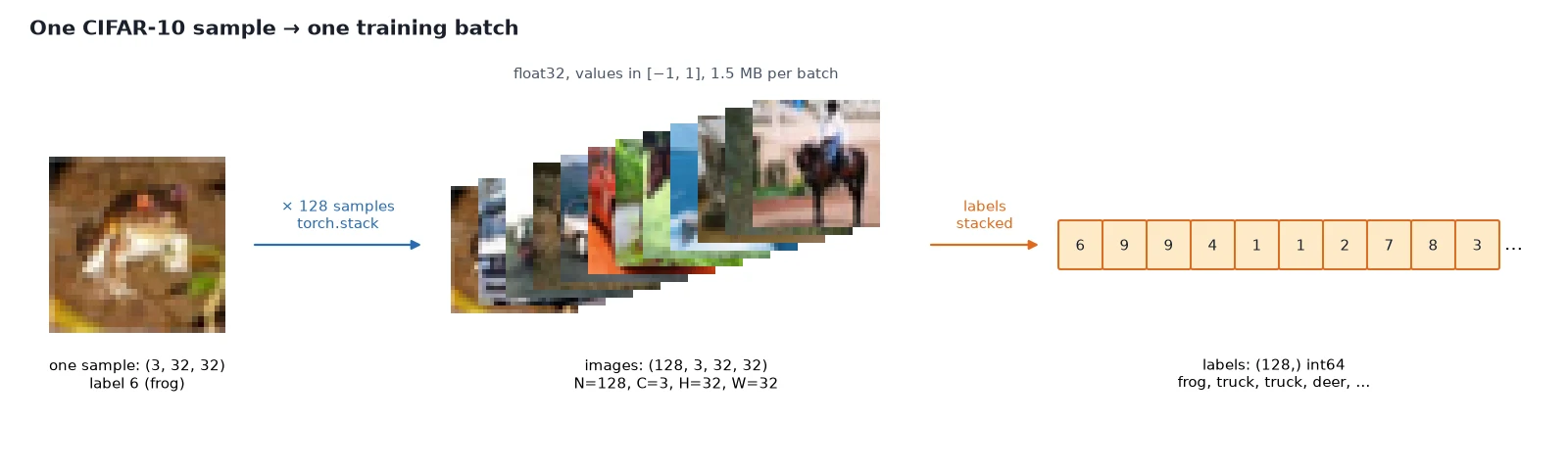
images: (128, 3, 32, 32) torch.float32 range [-1.00, 1.00]
labels: (128,) torch.int64 [8, 7, 5, 7, 1, 7, 5, 7]
first 8 classes: ['ship', 'horse', 'dog', 'horse', 'automobile', 'horse', 'dog', 'horse']
batches per epoch: 390This is the batch TinyDiT will see for the rest of the series: images of shape (128, 3, 32, 32), float32, in [-1, 1], plus labels of shape (128,), int64.
One epoch is 390 batches: 50{,}000 / 128 = 390.6, and drop_last=True throws away the final 80 images so every batch has the same size. They aren’t lost; with shuffling, different images are left out each epoch.
Let’s look at a batch with the save_grid helper from post 2:
import torch
from tinydit.data import get_cifar10, make_loader
from tinydit.images import save_grid

torch.manual_seed(0)
loader = make_loader(get_cifar10("data", train=True), batch_size=64, num_workers=0)
images, labels = next(iter(loader))
save_grid(images, "cifar_batch.png", nrow=8)    # 8x8 grid, from tinydit/images.py (post 2)
print("saved cifar_batch.png from a batch of", tuple(images.shape))saved cifar_batch.png from a batch of (64, 3, 32, 32)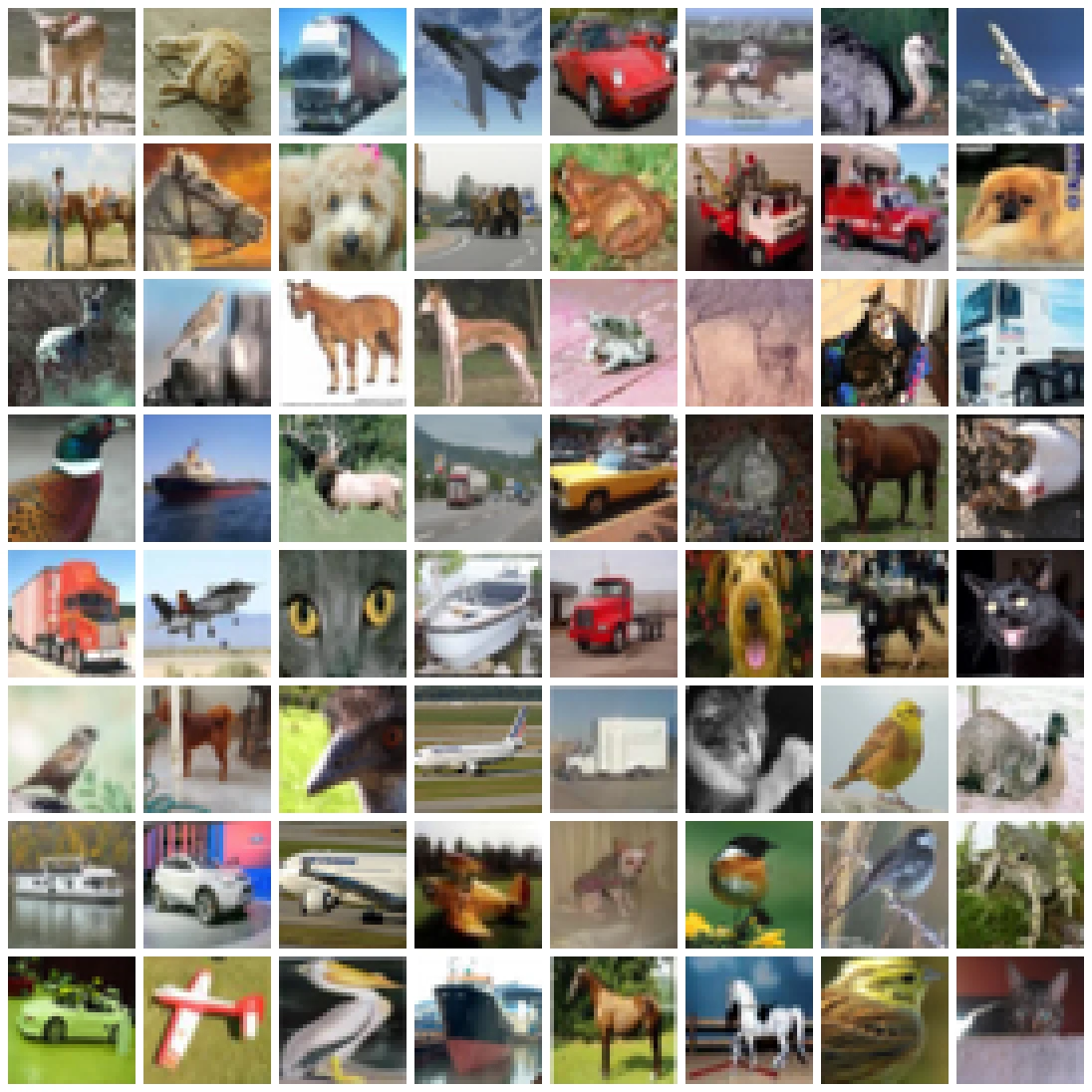
Subsets for fast runs, and a fixed held-out set
On a CPU, 50,000 images per epoch is a lot. Two switches help: a class filter (one class is easier to learn, so samples look good sooner) and a size limit.
We also make a held-out loader from the test split with shuffle=False. From post 8 onward we’ll measure the model’s error on it, and a fixed order means the number is comparable between runs:
from tinydit.data import get_cifar10, make_loader, CIFAR10_CLASSES

cars = get_cifar10("data", train=True, classes=[1])            # only "automobile"
small = get_cifar10("data", train=True, limit=512)             # a quick CPU subset
print(CIFAR10_CLASSES[1], "only:", len(cars), "| small:", len(small))
x, y = next(iter(make_loader(cars, batch_size=16, num_workers=0)))
print("labels in a cars batch:", y.unique().tolist())

held_out = make_loader(get_cifar10("data", train=False, limit=1024), batch_size=256, shuffle=False)
first = [y[:5].tolist() for _, y in held_out][0]
again = [y[:5].tolist() for _, y in held_out][0]
print("held-out order is fixed:", first == again, first)automobile only: 5000 | small: 512
labels in a cars batch: [1]
held-out order is fixed: True [3, 8, 8, 0, 6]num_workers: loading in parallel
With num_workers=0, the main process loads every image itself, and the model waits. With workers, separate processes prepare the next batches in the background:
import time
import torch
from tinydit.data import get_cifar10, make_loader

ds = get_cifar10("data", train=True)
for workers in (0, 2, 4):
    loader = make_loader(ds, batch_size=128, num_workers=workers)
    it = iter(loader); next(it)                    # start-up cost not counted
    t0 = time.perf_counter()
    for _ in range(50):
        next(it)
print(f"num_workers={workers}: {50 / (time.perf_counter() - t0):6.1f} batches/s")num_workers=0: 54.3 batches/s
num_workers=2: 105.8 batches/s
num_workers=4: 206.1 batches/sOn my 8-core test machine, 2 workers doubled the throughput and 4 workers roughly quadrupled it. On Colab, 2 workers is a good default (the free machines have 2 CPU cores).
Two more defaults in make_loader: pin_memory=True on CUDA machines, which makes copying batches to the GPU faster, and persistent_workers=True, which keeps workers alive between epochs instead of restarting them.
Watch out: If you ever get strange multiprocessing errors (common in notebooks on Windows and macOS), set num_workers=0 first to rule them out.
What you just built: Real (128, 3, 32, 32) CIFAR-10 batches, a saved preview grid, CPU-sized subsets, a fixed held-out loader, and parallel workers.
Step 5/6: Train on Your Own Images
In this step: We write ImageFolderDataset so any folder of pictures produces exactly the same batches as CIFAR-10.
CIFAR-10 is the default, but you shouldn’t be stuck with it. ImageFolderDataset loads every image under a folder, resized and center-cropped to 32×32, with the parent folder’s name as the label:
my_images/
├── cats/
│   ├── 0001.png        -> label 0
│   └── ...
└── dogs/
    ├── 0002.jpg        -> label 1
    └── ...
# One flat folder of pictures (no sub-folders) also works: every image gets label 0.
Here is the dataset. __init__ only collects file paths, and __getitem__ opens and transforms one file on demand:
class ImageFolderDataset(Dataset):
    """Every image under `root` (recursively). Label = index of its parent folder name.

    root/
      cats/001.jpg  -> label 0
      dogs/abc.png  -> label 1
      loose.png     -> label of folder "." (all-in-one-folder works too)
    """

    def __init__(self, root: str | Path, img_size: int = 32, train: bool = True):
        self.root = Path(root)
        self.paths = sorted(p for p in self.root.rglob("*") if p.suffix.lower() in IMG_EXTS)
        if not self.paths:
            raise FileNotFoundError(f"No images found under {self.root}")
        folders = sorted({str(p.parent.relative_to(self.root)) for p in self.paths})
        self.class_to_idx = {name: i for i, name in enumerate(folders)}
        self.transform = make_transform(img_size, train)

    def __len__(self) -> int:
        return len(self.paths)

    def __getitem__(self, idx: int) -> tuple[torch.Tensor, int]:
        path = self.paths[idx]
        img = Image.open(path).convert("RGB")
        label = self.class_to_idx[str(path.parent.relative_to(self.root))]
return self.transform(img), labelTo test it, we write 40 CIFAR cats and dogs into that layout at 64×64, pretending they’re your photos:
# Build a little image folder from CIFAR pictures, the way you'd organize your own photos.
from pathlib import Path
from torchvision import datasets
from tinydit.data import ImageFolderDataset, make_loader

raw = datasets.CIFAR10(root="data", train=True)
root = Path("my_images")
for i in range(200):
    img, label = raw[i]
    if label in (3, 5):                                 # cats and dogs only
        sub = root / ("cats" if label == 3 else "dogs")
        sub.mkdir(parents=True, exist_ok=True)
        img.resize((64, 64)).save(sub / f"{i:04d}.png")  # pretend they're bigger photos

ds = ImageFolderDataset("my_images", img_size=32)
print(len(ds), "images | classes:", ds.class_to_idx)
x, y = next(iter(make_loader(ds, batch_size=8, num_workers=0)))
print(tuple(x.shape), f"[{x.min():.2f}, {x.max():.2f}]", y.tolist())40 images | classes: {'cats': 0, 'dogs': 1}
(8, 3, 32, 32) [-1.00, 1.00] [0, 0, 1, 0, 0, 1, 1, 0]The batch has exactly the same format as the CIFAR batches. Any later post that takes a loader will accept this one too. Swapping datasets is a one-line change.
What you just built: ImageFolderDataset, tested on a folder of cats and dogs, giving the same batch format as CIFAR-10.
Step 6/6: When __getitem__ Is Wrong
In this step: We break a Dataset on purpose and learn to read the error the DataLoader throws.
Bugs in a Dataset don’t usually crash inside your code. They crash later, inside the DataLoader, with a message that seems to have nothing to do with your data. The classic: one image skipped the resize and has a different size.
import torch
from torch.utils.data import Dataset, DataLoader

class Buggy(Dataset):
    """Sample 5 is accidentally the wrong size (think: one odd image that skipped the resize)."""
    def __len__(self):
        return 8
    def __getitem__(self, i):
        size = 30 if i == 5 else 32
        return torch.zeros(3, size, size), 0

try:
    for xb, _ in DataLoader(Buggy(), batch_size=4):
        print("ok batch", tuple(xb.shape))
except RuntimeError as e:
print("RuntimeError:", e)ok batch (4, 3, 32, 32)
RuntimeError: stack expects each tensor to be equal size, but got [3, 32, 32] at entry 0 and [3, 30, 30] at entry 1The first batch was fine. The second crashed in stack (the collate step that glues samples into a batch), because sample 5 was 30×30.
Watch out: If you see stack expects each tensor to be equal size, the fix is in your __getitem__ or transform, not your model. Our make_transform always resizes and crops, so every sample is exactly (3, 32, 32).
Other bugs are quieter: returning HWC instead of CHW, or forgetting to normalize, trains without any error and just produces bad results.
Note: A good habit is to print the shape, dtype and range of one batch, and save a grid of it, before you train anything. That’s exactly what the snippets in step 4 do.
What you just built: A way to recognize collate errors and a habit that catches the silent data bugs.
Recap
- A Dataset returns one sample by index (
__len__,__getitem__). A PyTorch DataLoader shuffles, batches, collates and loads in parallel. - Our transforms are minimal: ToImage → Resize/CenterCrop → horizontal flip (training only) →
float32→ Normalize to [-1, 1]. get_cifar10andmake_loadergive TinyDiT batches of(128, 3, 32, 32)images in [-1, 1] plus(128,)labels. There are options for class subsets, CPU-sized limits, and a fixed held-out loader.ImageFolderDatasetgives your own pictures exactly the same format, so switching data is a one-line change.num_workersspeeds up loading a lot. Errors likestack expects each tensor to be equal sizepoint at your Dataset, not your model.
Next up: In PyTorch nn.Module and the Training Loop: Layers, Loss, and Checkpoints we put a real model on top of these batches: nn.Module, the layers inside a transformer’s feed-forward block, AdamW, and a reusable Trainer that can save and resume checkpoints.
Series: PyTorch Tutorial 2026 (14 posts)
- Post 1: PyTorch Tutorial 2026: From Tensors to Tiny Diffusion
- Post 2: PyTorch Tensors Explained: Shapes, Broadcasting, and Images as Arrays
- Post 3: PyTorch Autograd: How backward() Builds Gradients
- Post 4: PyTorch DataLoader Explained: Datasets, Batches, and Image Folders (you are here)
- Post 5: PyTorch nn.Module and the Training Loop: Layers, Loss, and Checkpoints
- Post 6: Attention and the Transformer Block in PyTorch
- Post 7: Patch Embeddings in PyTorch: How a Transformer Reads an Image
- Post 8: Flow Matching in PyTorch: Train a Model to Follow a Straight Line
- Post 9: Build a Tiny Diffusion Transformer in PyTorch (DiT from Scratch)
- Post 10: torch.compile, Mixed Precision, and SDPA: Speed Up TinyDiT
- Post 11: RMSNorm, QK-Norm, SwiGLU, and 2D RoPE in a Tiny DiT
- Post 12: adaLN-Zero and Classifier-Free Guidance in PyTorch
- Post 13: MMDiT Joint Attention in PyTorch: Two Streams, One Generator
- Post 14: Train and Sample Like 2026: Logit-Normal Steps, EMA, and Few-Step Flow
← Previous: Post 3: PyTorch Autograd: How backward() Builds Gradients
Next → Post 5: PyTorch nn.Module and the Training Loop: Layers, Loss, and Checkpoints